Showing posts with label Ugo Capeto Talks Music. Show all posts

Wednesday, July 6, 2011

How to get the average audio level in Audacity

Oh boy, that's a really good question! I don't know about you but it's kinda nice to have an idea of the average audio level (loudness) of a track, especially if you're working on an album and you want all the tunes to be at about the same average audio level.

When you are in Audacity and play a track, the meter levels show you a bunch of things, in particular, the average audio level (that's the light green portion of the meter) and the peak audio level (that's the dark green portion of the meter). The average audio level and the peak level can also be seen when you switch the wave display from "waveform" to "waveform (DB)" - click on the arrow next to the name of the wave to make the switch. The light blue is the average audio level and the dark blue is the peak. It kinda gives you an idea but it's far from ideal, right?

What you really want is some kind of wave analyzer that can spit out the average audio level for the whole track. Well, low and behold, there's actually a plugin for Audacity that does just that. You can get it here: "Wave Stats" plug-in for Audacity. There's another plugin called "Wave Info" but it's the same thing, it just outputs the values in a format that you can more easily copy and paste. "Wave Stats" gives you the whole important although somewhat controversial average audio level known as the RMS (root mean square) average audio level (it kinda measures loudness). "Wave Stats" also gives the A-weighted RMS average audio level. A-weighting takes into account the big difference in terms of perceived loudness between bass (low pitched) and treble (high pitched) sounds of the same power. Indeed, bass never sounds as loud as treble because we, humans, hear high frequency sounds much better than low frequency ones. In a nut shell, A-weighting gives lower weights to low frequency sounds to account for the human ear.

Since a photo speaks a thousand words, a video must speak a million of them. Here's a little video I made about how to get the average audio level of a wave track in Audacity.


For now, you can only process the first 30 seconds of a selection (by default, it's the first 10). I am sure that, by the time you read this, you'll be able to process a whole tune, although it could be just wishful thinking.

Saturday, May 7, 2011

Playing any Major or Minor Scale on a Guitar

If you think learning to play the guitar is a daunting task, well, let's just say that you're not completely wrong. In my opinion, you need to know what you are doing every step of the way (always know why you are playing that string on that fret), otherwise it's gonna be a very long and tedious journey. The first thing to focus on is the scales. Soon enough, you are gonna be able to play guitar solos like a pro, one note at a time.

You need to know a few things before you can play scales (let's focus on major and minor scales for this "lesson"):

1) You need to know the number of half-steps between adjacent notes in the scale. For major scales, the notes are one step (two half steps) apart except between the degrees 3-4 and 7-8 where it's only one half step. For minor scales, the notes are one step (2 half steps) apart except between the degrees 2-3 and 5-6 where it's only one half step. This is absolutely necessary to know!

2) You need to know that there's a half step between the notes E and F and the notes B and C. All other adjacent non-accidental notes (neither sharp, nor flat) are one step apart. That will enable you to find the tonic of the scale you want to play. After that, you don't really need that knowledge.

3) You need to know the notes the open strings play. It's E-A-D-G-B-E (a mnemonic for it is "Every Apple Does Go Bad Eventually") where:
E is the 6th string (pitched the lowest, thickest, closest to ceiling)
A is the 5th string
D is the 4th string
G is the 3rd string
B is the 2nd string
E is the 1st string (pitched the highest, thinnest, closest to floor)

4) You need to know that a fret on the guitar neck represents one half step. More precisely, two adjacent frets are one half step apart in terms of pitch.

5) You need to know the fret that gives you the note that's one step away (ascending) on the next string. It's always three frets away (toward the headstock) except when you go from the 3rd to the 2nd string where it's only two frets away. An open string counts as one fret.

6) You need to know the fret that gives you the note that's one half step away (ascending) on the next string. It's always four frets away (toward the headstock) except when you go from the 3rd to the 2nd string where it's only three frets away. An open string counts as one fret.

Armed with this knowledge, you can play any (major or minor) scale on your guitar by just counting the frets.

Say, for example, you want to play the C major scale on your guitar:

1) Where is C? We're gonna locate C on the A string, that is, the 5th string. A and B are one step apart so B is on the 2nd fret. B and C are one half step apart so C is on the 3rd fret. You are now at the scale tonic, that is, degree 1. All you need to do now is remember the spacing step-wise of the scale degrees and count the frets to go from degree to degree as intelligently as possible, that is, changing strings whenever it makes sense. You absolutely don't need to know the names of the notes on the fretboard at this point. Here, we are gonna play in the 1st position, meaning we want to play frets 0 (open string), 1, 2, and 3 with the index on the 1st fret, the major on the 2nd fret, and the ring finger on the 3rd. The goal is to have your hand move as little as possible on the fretboard by playing over 4 frets.

2) Where is degree 2? Degree 2 is one step away from degree 1 and is therefore on the 0th fret (open string) of the 4th string (the D string).

3) Where is degree 3? Degree 3 is one step away from degree 2 and is therefore on the 2nd fret of the 4th string.

4) Where is degree 4? Degree 4 is one half step away from degree 3 and is therefore on the 3rd fret of the 4th string.

5) Where is degree 5? Degree 5 is one step away from degree 4 and is therefore on the 0th fret (open string) of the 3rd string (the G string).

6) Where is degree 6? Degree 6 is one step away from degree 5 and is therefore on the 2nd fret of the 3rd string.

7) Where is degree 7? Degree 7 is one step away from degree 6 and is therefore on the 0th fret (open string) of the 2nd string (the B string).

8) Where is degree 8? Degree 8 is one half step away from degree 7 and is therefore on the 1st fret of the 2nd string.
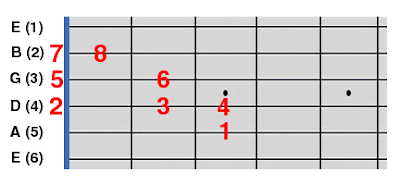
C major scale degrees on a guitar fretboard
Here's what your hard work has produced! The black numbers indicate the guitar strings (the 6th string or E low is the bottom string but is the one closest to the ceiling when you actually hold a guitar). The red numbers on the fretboard indicate the degrees of the C major scale (they absolutely don't represent fingering).


You can keep going like this until you run out of strings and you can also go backwards from the tonic, again until you run out of strings the other way. As you can see, you have a limited number of scale notes to work with in your solos but it's a pretty good start.

You can do that very same exercise for any tonic (also known as root) and any type of scale (major or minor). I believe it's simpler to only look at the degrees within the scale, not the actual note names (except for the tonic). Well, at least, until you are more familiar with where the notes are on the fretboard.

There's no real wrong way to play scales as you can do whatever you want as long as you play the right notes, even if it means playing all the scale notes on one single string and (the horror!) one finger.
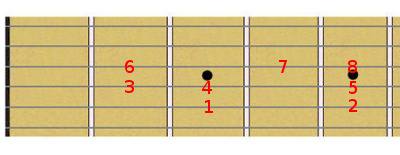
C major scale degrees on a guitar fretboard
For reference, this is the exact same C major scale as shown above, except that it is played in the 2nd position (no open strings). The neat thing is that you can play this pattern up and down the fret board and you'll always play a major scale (different roots).

Thursday, April 28, 2011

An indie artist I like : Marcomé

Marcomé is a Canadian artist that started her career in the "music biz" as a sound and mastering engineer. As such, she worked with some of the biggest names in the recording industry. After a while, she probably kinda felt that she could go on the other side of the recording studio and give it a shot. That's what she did!

Marcomé's music can probably be classified broadly as "new age" in the same vein as somebody like Enya. To me, it's more downtempo "melodic electronica" with some ambient, chillout, and lounge mixed in. It's everything I, Ugo Capeto, like, the bonus being that she sings heavenly well! Her voice is quite unique but you're gonna have to listen to the tracks to find out what's so special about it.

She's got two albums under her belt: "Seven Seas" released in 1995 and "River of Soul" released in ... well, later. She's also released remastered albums, revisiting earlier tunes (a form of recycling that I truly appreciate).

You can go to New Age Music World of Ambient singer Marcomé to find out more about Marcomé and to purchase her music (there are some freebies too). I've selected three videos from Marcomé's youtube channel for you to check out. Maybe, one day, she'll sing on one of my tracks (cue the dream sequence music) and do some percussion too.


French version of "Yeku" from the "Seven Seas Remastered" album.


"Memoria" from the "Seven Seas Remastered" album.


"Twitter me some Love" by Marcomé & Bruno Pelletier. Yeah, it's a song about social media websites. Pretty cool, eh?

Marcomé was kind enough to subject herself to a few questions ...

Ugo: Where/how did you learn to play keyboards, sing, and write music?

Marcomé: I spent part of my childhood with my uncles who owned a music instrument and sound shop. After working hours, I would play with the sound systems, hooking up speakers to amplifiers, recording my voice on a 2 track tape recorder while experimenting with guitar and violin. As a teenager, I bought my first 4-track recorder along with a keyboard and recorded some of the songs that would later end up on my first music CD Seven Seas.

I’m a self trained musician and a sound engineer. I had the privilege to work with renowned music artists whom inspired me to pursue my musical dream.

Ugo: What's the process you go through to write/produce a tune?

Marcomé: Never exactly the same. I can create a song out of anything. Could be a sound I hear, a tone I create with my singing or someone playing with me and we improvise. I get lots of inspiration when I travel in a plane, a car, a train or when I take a walk. It's as if I'm doing a soundtrack for the movie of my life! Creating a new song is for me like a game. I play with my portable toy which we all have and it's called imagination. With a bit of practice, anyone gets good at it no matter the style!!

When it comes to lyrics, so far I work with Ron Montanaro and Pierre Létourneau. I love to join with other specialists!

Ugo: What's your home setup? Do you record/master at home?

Marcomé: I have been using Mac all my life and used many platforms such as Performer, Logic and Protools. When the time comes to record other musicians parts, I love to work with a different studio to get my head and hands entirely focused on the creative process.

In my studio: For my voice I use an old Audio Technica AT4050 going through a modified Focusrite Voicebox. I use an RME Fireface 800 as a sound card. I have a bunch of Spectrasonics sounds and I've started to work with Melodyne which allows me to convert my singing into midi tracks. This way, I sing the bass part for example and Melodyne translates the singing into a midi track I get played from any virtual synth.

A big thanks to Marcomé and I am gonna have to check out that Melodyne thing, eheh.

Friday, April 22, 2011

Building Chords in a Step Sequencer

When you make music with a step sequencer, it's real easy to build chords without having to look at any chord chart or use any chord making tool. Here, I am gonna talk about major, minor, diminished, and augmented triads but this extends to all types of chords.

The step sequencer's piano roll is divided into cells. Each cell represents a half-step on the vertical axis.

A major triad chord is built with 3 notes: the root, a note that's 4 half-steps higher (major third) and a note that's 7 half-steps higher (perfect fifth). In integer notation, it's represented by the triplet 0-4-7. To build a major chord, you pick the root, place the 2nd note 4 half-steps up, and the 3rd note 7 half-steps up. From that major triad, you can build the minor, diminished, or augmented triads quite easily by shifting the 2nd and/or 3rd note by a half-step.

A minor triad chord is represented by the triplet 0-3-7. Starting from a major triad chord, all you need to do to get to the minor chord is to bring down the 2nd note by half a step.

A diminished triad chord is represented by the triplet 0-3-6. Starting from a major triad chord, all you need to do to get to the diminished chord is to bring down the 2nd note and 3rd note by half a step.

An augmented triad chord is represented by the triplet 0-4-8. Starting from a major triad chord, all you need to do to get to the augmented chord is to bring up the 3rd note by half a step.

Diatonic chords are chords made up of notes that are always within a given scale. The diatonic triad chords of a major or minor scale are always major, minor, or diminished. To build a diatonic chord for a given major or minor scale and a given root, you start with a major chord and either keep it as is or bring it down to a minor chord or diminished chord until all the chord notes are within the scale. So, basically, all you need to know are the notes of the scale you are working on (more on this below).

For a major scale, the intervals between the notes are as follows:
1-2-3-4-5-6-7-8 <- note degrees (positions within the scale)
-2-2-1-2-2-2-1- <- intervals (in half-steps)
Intervals 3-4 and 7-8 are just 1 half-step while all the others are 2 half-steps.

For a minor scale, the intervals between the notes are as follows:
1-2-3-4-5-6-7-8 <- note degrees (positions within the scale)
-2-1-2-2-1-2-2- <- intervals (in half-steps)
Intervals 2-3 and 5-6 are just 1 half-step while all the others are 2 half-steps.

There are 7 notes in a major or minor scale. The note at degree 1 is the scale tonic (it defines the scale). The note at degree 8 is the note at degree 1 raised by 1 full octave.

Friday, July 9, 2010

An indie band I like: Trestles

Trestles is a band based in the Los Angeles area. Found them on Reverbnation after they had become fan of ... well, myself. Being the curious type and because they were so nice to me, I did check them out and, to my surprise, have found quite a few similarities between their music and mine, in particular, the mix of downbeat, ambient (I am not gonna say "new age") tracks and more upbeat, faster (almost dance ready) tracks. Hope they don't mind the comparison though - head scratching.

It's always hard to describe somebody's music. Is it even necessary when you have a bunch of tracks ready to be listened to? Let me try anyway ... Trestles' sound is a combination of vintage 80s synths, kick-ass percussion and just the right amount of chiptune. But, what sets Trestles apart is the melodies and without those, well, songs are not quite songs.

Let's start the musical journey into the world of Trestles with a song called "Blue Horns":


ComScore


Can you hear those chiptune square waves in the mix? Wish it were a tad longer because the hook is off... the hook. Kinda reminds me of the "Merry Christmas Mr. Lawrence" Ryuichi Sakamoto tune.

Let's continue with "Bobbit Drive":


ComScore


A nice hook, an 80s synth patch and some powerful drumming make up this catchy tune. Killer track and the crowd seems to love it, eheh.

To finish things up, here's the video for a slower paced but highly melodic Trestles tune called "The Future Is At Hand":


They have many more tunes to listen to. So, for much more of Trestles, please check Trestles at Reverbnation.

You see, if you become a fan of Ugo Capeto at Reverbnation like Trestles, you might end up on this very blog (jk).

Wednesday, June 9, 2010

Let's get the party started!

After quite a bit of fiddling around with the Korg DS-10 at the Home of the Korg DS-10, I think it's time to distance myself from the Nintendo DS (not that there's anything wrong with it). Music knows no boundaries and I really don't want to limit myself to one piece of equipment to write and publish songs.

I have started writing music on the PC using Digital Audio Workstations, like FL Studio and Reaper. Any tune I come up with will be published here and on youtube. Of course, I will still be doing tunes on the DS-10 but those will go on the Home of the Korg DS-10, aka the other blog (and maybe here also).

Tutorials for DAWs (step sequencers, in particular)? Hmmm, yeah, I might do some as I get better at using them although I am sure there are tons of them on the internet already.

The other thing I really would like to do is the sharing of melodic motifs that either went into a song or were left unused. Melodic motifs are melodies that span a few bars - they are sometimes referred as hooks (easier to say than melodic motifs or phrases, I guess). So, why not share those melodies and maybe, maybe, somebody will use or reuse them in a completely different environment to make ... huh, whatever. That would be very cool, I think. So, there will probably be a section on here that's just about melodic motifs, shareware style. Not sure how it's gonna be presented, probably in the form of a piano roll picture and a short audio file or maybe a video with the picture as the background.

We'll see how it goes.